


You have a spreadsheet of data — customer records, product inventory, survey responses — and you need to get it into a database table. Writing INSERT INTO statements manually for 500 rows is not an option. Running a Python script you are not 100% sure about on sensitive production data feels risky. There is a better way.
The Problem With Raw CSV Data and Databases
CSV files are deceptively simple. They look like clean, importable data. But between your spreadsheet and your database, several things can go wrong:
Data type mismatches: Dates that look like 10/02/2026 in Excel need to become 2026-10-02 in SQL. Numbers with commas (1,000) need the comma stripped. Empty cells need to become NULL, not empty strings.
SQL injection through data: If your CSV contains customer-provided text (product descriptions, addresses, names), any unescaped apostrophe (') will break the INSERT statement and could — in less secure contexts — enable injection attacks. Every string value must be properly quoted and escaped.
Encoding issues: Accented characters, Devanagari text, and emoji in CSV files encoded as Latin-1 instead of UTF-8 will produce garbled INSERT statements that fail with character set errors.
Header row confusion: Many importers accidentally try to insert the header row as data, causing type errors or duplicate-key violations on the first run.
A proper CSV-to-SQL converter handles all of this automatically.
The Hidden Risk of Online Converters
The typical developer workflow: Google "csv to sql online", upload the file, download the SQL. The problem is that your CSV may contain sensitive business data — customer PII, financial records, internal inventory, or pricing data — that you are now uploading to an unknown third-party server.
Bramhify's CSV to SQL Converter processes your file 100% in your browser. The CSV is parsed by JavaScript running on your device, the SQL is generated locally, and nothing is transmitted to any server. Your sensitive data stays on your machine.
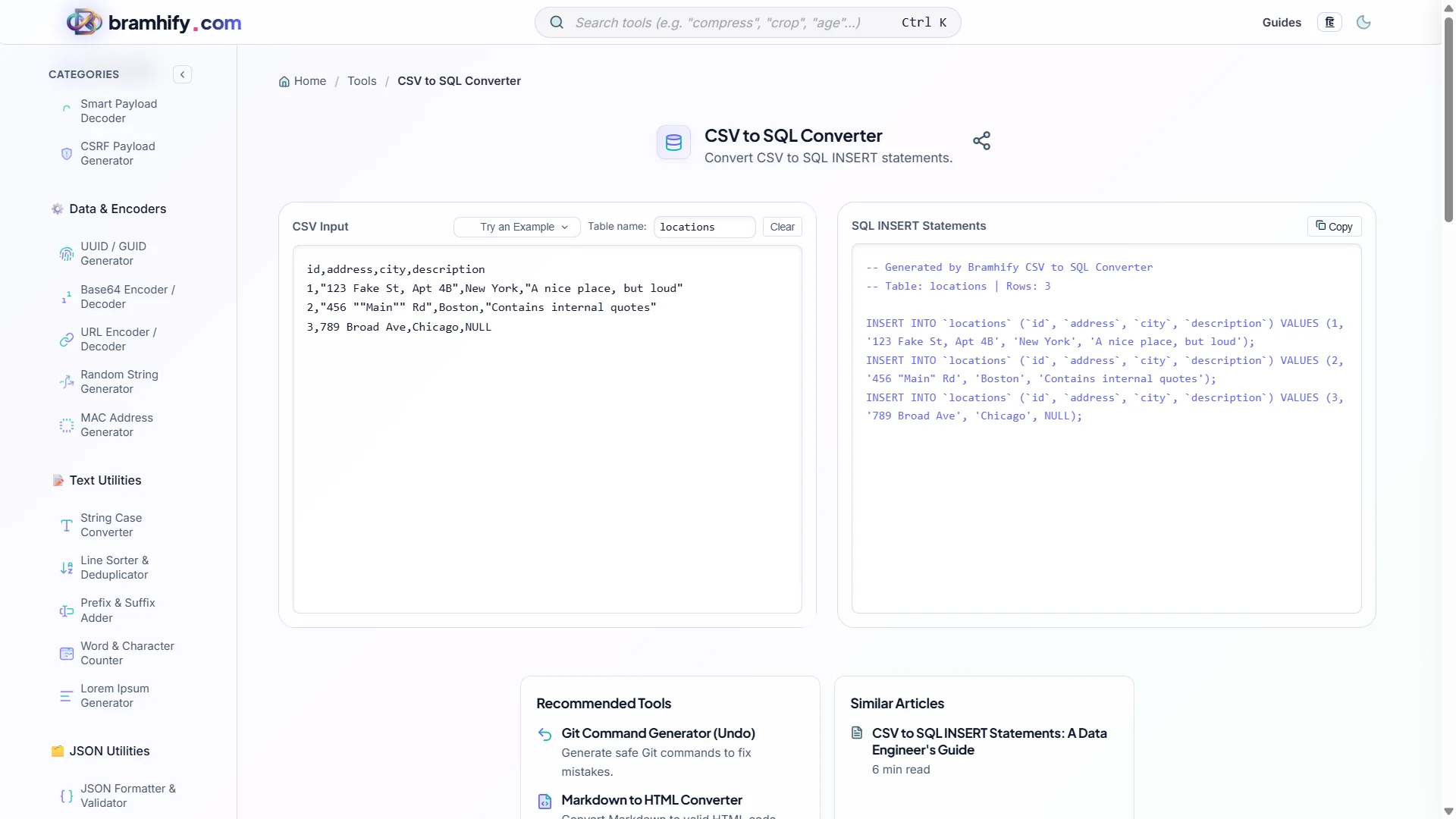
CSV to SQL Converter:

Step-by-Step Guide
Step 1: Prepare Your CSV
Open your spreadsheet and verify: the first row is the header row with column names, there are no merged cells, and the data is reasonably clean. Save as .csv (UTF-8 encoding if your spreadsheet app offers it — particularly important for Hindi or other non-ASCII text).
Step 2: Paste or Upload Your CSV
Open the CSV to SQL Converter and paste your CSV data into the input panel (or use the upload option). The tool automatically detects the header row and shows you a preview of the parsed columns.
Step 3: Set Your Table Name
Enter the target table name exactly as it appears in your database (case-sensitive depending on your DB engine — MySQL on Linux is case-sensitive; on Windows it is not).
Step 4: Review and Copy the SQL
The tool generates complete INSERT INTO table_name (col1, col2, ...) VALUES (...) statements for every data row, with strings properly quoted and escaped. Review the first few rows to spot any unexpected type conversions, then copy the full SQL output.
When CSV-to-SQL Is (and Is Not) the Right Tool
✅ Good Use Cases
Seed data for development databases: When setting up a development environment, you often need to populate tables with realistic sample data from a spreadsheet. CSV-to-SQL generates the seed file instantly.
One-time data migrations: Moving data from a legacy system that exported CSV into a new schema. Perfect for data that arrives as a one-off batch.
Interview and coding assignments: Many data engineering assignments involve loading a provided dataset into a local SQLite or PostgreSQL instance. A CSV-to-SQL converter is the fastest path from spreadsheet to queryable data.
Prototyping and hackathons: When you need data in a database fast and cannot spend 30 minutes writing a Python ETL script.
❌ When to Use Something Else
Ongoing, automated imports: For recurring CSV imports (daily sales reports, weekly inventory updates), write a proper ETL pipeline using Python (pandas + SQLAlchemy) or a data integration tool (dbt, Airbyte). A browser tool is a one-off utility, not a scheduled pipeline.
Very large files: For CSV files with tens of thousands of rows, database-native bulk loaders (COPY in PostgreSQL, LOAD DATA INFILE in MySQL) are significantly faster than individual INSERT statements. The COPY command can load millions of rows per minute; INSERT statements cannot.
Complex transformations: If your data needs joining, deduplication, type inference, or conditional logic before insertion, write the transformation in code where it is testable, version-controlled, and repeatable.
Frequently Asked Questions (FAQs)
What happens if my CSV contains single quotes in the data?
Single quotes inside SQL string values must be escaped by doubling them: O'Brien becomes 'O''Brien' in SQL. A proper CSV-to-SQL converter handles this automatically. If you are pasting the generated SQL into a database and seeing syntax errors, look for unescaped apostrophes in your data — names, addresses, and descriptions are common sources.
Can I use the generated SQL with any database?
The generated INSERT INTO syntax is standard ANSI SQL and works with MySQL, PostgreSQL, SQLite, and SQL Server. There are minor dialect differences for data type handling (for example, NULL handling and boolean representations differ slightly), but for basic string and number data, the output is compatible across all major databases.
How do I handle NULL values in my CSV?
In CSV, empty cells (consecutive delimiters with nothing between them) should become NULL in SQL, not empty string ''. An empty string and NULL are semantically different — NULL means "unknown" while '' means "empty." A quality converter outputs NULL for empty cells. If your downstream SQL logic queries WHERE column IS NULL, this distinction matters.
See also: JSON Formatter Online: Validate & Beautify JSON Privately