


Every software engineer remembers the heart-stopping moment they committed directly to main instead of a feature branch, accidentally included .env in a commit, or pushed a broken migration to origin. In panic, half of developers paste the first git reset --hard snippet they see on Stack Overflow—and permanently wipe out three hours of uncommitted code.
Undoing Git mistakes is 100% predictable once you pick the right command based on one single question: Have you already pushed this commit to a shared remote branch?
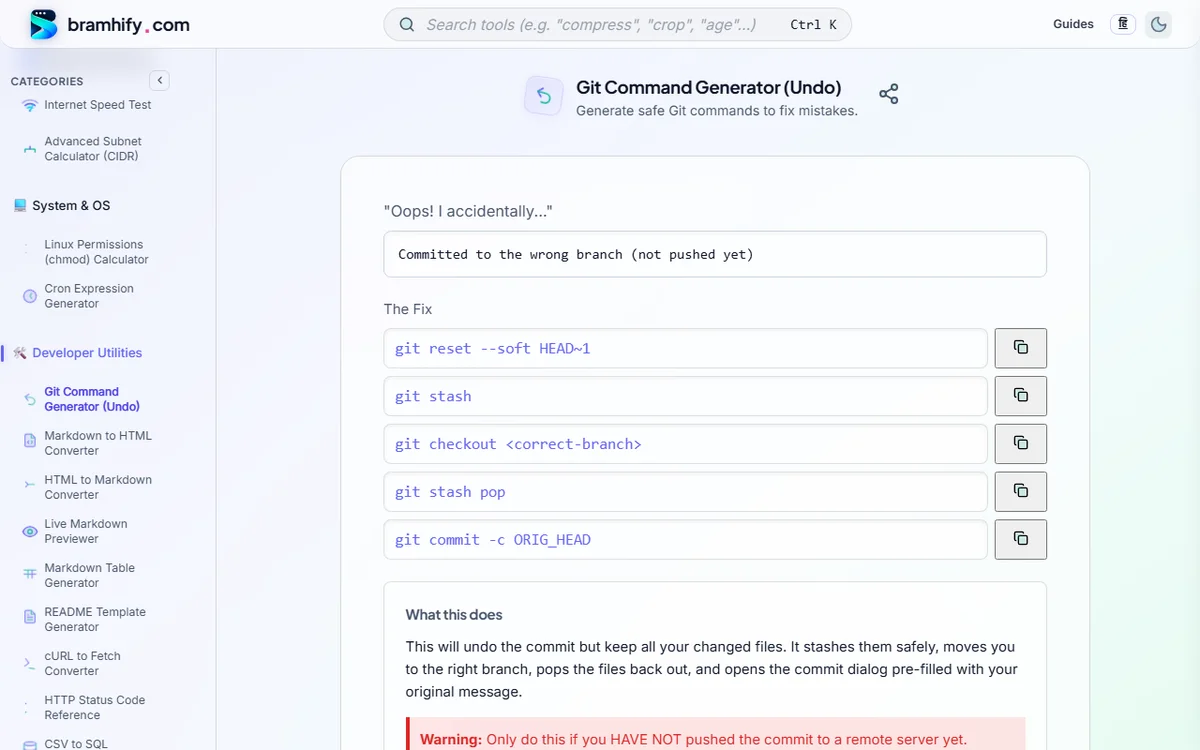
Bramhify's 100% offline Git Command Generator translates plain-English "Oops! I accidentally..." scenarios directly into the safest exact Git commands—complete with plain-English explanations of what happens to your Working Directory, Staging Area, and commit history, plus explicit danger warnings before any destructive operation.
Decision Matrix: Which Git Undo Command Should You Use?
| Mistake Scenario | Already Pushed? | Safest Command | Keeps Your Code Changes? |
|---|---|---|---|
| Typo in last commit message | No (Local) | git commit --amend -m "New message" | Yes |
| Forgot a file in last commit | No (Local) | git add file.js && git commit --amend --no-edit | Yes |
| Committed to wrong local branch | No (Local) | git reset --soft HEAD~1 → git switch -c feat → commit | Yes (staged!) |
| Unstage a file before committing | No (Local) | git restore --staged <file> | Yes (in working tree) |
Undo a commit on shared main | YES (Pushed) | git revert <commit-hash> | Creates safe inverse commit |
| Move 1 specific commit to another branch | Either | git cherry-pick <commit-hash> | Copies commit cleanly |
| Throw away ALL local uncommitted edits | No (Local) | git reset --hard HEAD (Destructive!) | NO — irreversible! |
Find the Exact Safe Git Command Offline:

Understanding git reset: --soft vs. --mixed vs. --hard
All three reset flags move your branch pointer (HEAD) backwards (for example to HEAD~1, one commit earlier). They differ strictly in what they do to your Staging Area (Index) and Working Directory (files on disk):
| Reset Flag | Moves Branch Pointer (HEAD) | Resets Staging Area? | Overwrites Files on Disk? | Risk Level |
|---|---|---|---|---|
--soft | Yes | No (changes stay staged) | No | Safe — ideal for squashing or moving commits |
--mixed (default) | Yes | Yes (changes become unstaged) | No | Safe — ideal for re-staging cleanly |
--hard | Yes | Yes | YES — deletes tracked edits! | HIGH RISK — never run casually! |
Example: Move an Accidental Local Commit Off main onto a New Feature Branch
# 1. Create the feature branch pointing at your accidental commit
git branch feat/my-fix

# 2. Move main safely back 1 commit (since it was never pushed!)
git reset --hard HEAD~1

# 3. Switch to your new feature branch (your commit is safe here!)
git switch feat/my-fix
Why git revert Is Mandatory for Pushed Branches
Never run git reset + git push --force on main, develop, or any branch a teammate has pulled. Rewriting shared history forces every teammate's local repository out of sync and risks silently re-introducing the deleted commit on their next merge.
Instead, run:
git revert <bad-commit-sha>
git push origin main
git revert leaves history completely intact and appends a brand-new commit whose diff is the exact mathematical inverse of <bad-commit-sha>—preserving a clean audit trail and triggering normal CI/CD rollback pipelines cleanly.
Cherry-Pick & Emergency Rescue with git reflog
Copy One Specific Bugfix Commit to Another Branch (cherry-pick)
Need a single hotfix commit from feat/payments onto release/v2.4 without merging the whole branch?
git switch release/v2.4
git cherry-pick a1b2c3d
Emergency Rescue: "I Already Ran git reset --hard by Mistake!"
If your lost work was committed at least once (even locally and never pushed), Git keeps dangling commits in its garbage-collection buffer for ~30 days! Recover them in 10 seconds with git reflog:
# 1. Inspect every recent HEAD movement (even deleted commits!)
git reflog

# 2. Spot the commit hash right BEFORE your accidental reset (e.g. HEAD@{2} / f8c12a9)
git checkout -b rescue-branch f8c12a9
(Note: git reflog rescues committed snapshots, NOT files that were never committed—which is why committing early and often on local branches is a lifesaver!)
Frequently Asked Questions (FAQs)
What is the difference between git reset and git revert?
git reset rewrites commit history by moving your branch pointer backwards (use only for local, unpushed commits). git revert preserves history by creating a new commit that cleanly reverses the changes of an earlier commit (always use for pushed or shared branches).
Can I recover work after running git reset --hard?
If the changes were already committed before the hard reset, yes—run git reflog, find the previous commit SHA, and run git checkout -b rescue <sha>. If the changes were never committed and never stashed, git reset --hard deletes them permanently from disk.
How do I undo git add on a single file without deleting my edits?
Run git restore --staged path/to/file (modern Git 2.23+) or git reset HEAD path/to/file. Both remove the file from the Staging Area while keeping all your local code edits untouched.
If I must force-push my OWN personal PR branch after a rebase, what is the safest flag?
Always use git push --force-with-lease instead of git push --force. --force-with-lease aborts safely if a teammate or CI bot pushed a commit to that branch since your last fetch.
Need more offline DevOps & Linux terminal references?
Bookmark our Linux chmod File Permissions Guide, Cron Expression Generator Guide, and HTTP Status Codes Cheat Sheet.