


Setting up asymmetric JWT authentication (RS256, ES256, or EdDSA) in PHP, Laravel, Symfony, or Node.js always starts with the same chore: generating a clean public/private key pair in the exact format your runtime expects. On Windows machines without OpenSSL in PATH — or when switching between PEM files for PHP and JWK objects for frontend/edge verifiers — digging up obscure CLI flags slows every sprint down.
Why You Should Never Generate Keys on Server-Side Websites
Many top-ranking "online RSA key generator" sites generate your private key inside a remote PHP, Java, or Python process and return it over HTTP. That means a third-party server — along with its load balancers, APM traces, or access logs — briefly holds the exact private key you are about to deploy into production.
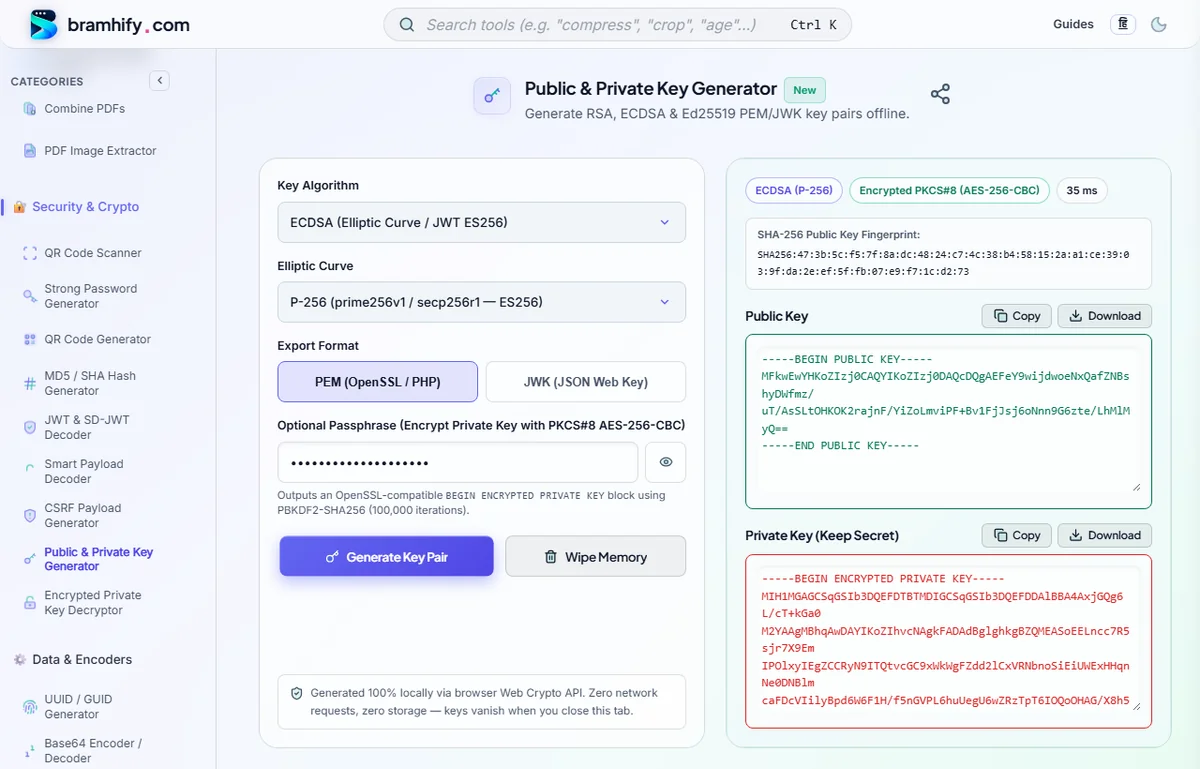
Bramhify's Public & Private Key Generator executes 100% locally in your browser using the native Web Crypto API (window.crypto.subtle). Zero external libraries are loaded, zero network requests occur, and keys live strictly in volatile browser RAM until you download them or click Wipe Memory.
Public & Private Key Generator:

RSA vs. ECDSA vs. Ed25519: Choosing the Right Algorithm
| Algorithm | JWT alg | Key Size / Curve | Best Use Case |
|---|---|---|---|
RSA (RSASSA-PKCS1-v1_5) | RS256 | 2048 / 3072 / 4096-bit | Universal compatibility with Laravel Passport, Symfony LexikJWT, firebase/php-jwt, and legacy enterprise APIs. |
| ECDSA | ES256 / ES384 / ES512 | P-256 / P-384 / P-521 | Tiny keys, fast mobile/edge verification, OAuth2/OIDC, and RFC 9901 SD-JWT credentials. |
| Ed25519 | EdDSA | 256-bit Edwards Curve | Ultra-fast deterministic signatures resistant to side-channel attacks; modern microservices and webhooks. |
| RSA-OAEP | Encryption | 2048 / 3072 / 4096-bit | Encrypting small secrets or symmetric keys asymmetrically (not for signing). |
Step-by-Step: Generate OpenSSL-Ready PEM & JWK Keys
Step 1: Pick Your Algorithm & Key Size
Open the Public & Private Key Generator. Choose RSA (2048-bit) for maximum compatibility with PHP and Java systems, ECDSA (P-256) for compact modern JWTs, or Ed25519 for modern EdDSA stacks.
Step 2: Select PEM or JWK Export Format
Keep PEM (OpenSSL / PHP) selected if you are dropping .pem files into PHP, Nginx, Node.js, or Go. Switch to JWK (JSON Web Key) whenever you need JSON objects for an OAuth2 /.well-known/jwks.json endpoint, Cloudflare Workers, or browser Web Crypto verification. You can toggle between PEM and JWK after generation without regenerating the key!
Step 3: Optionally Lock the Private Key with a Passphrase
In PEM mode, type an optional passphrase into the passphrase box. Bramhify encrypts the private key locally into an RFC 5958 -----BEGIN ENCRYPTED PRIVATE KEY----- block using PBES2 (PBKDF2-SHA256, 100,000 iterations + AES-256-CBC) — 100% interoperable with OpenSSL 3.x, PHP openssl_pkey_get_private(), and Node.js crypto.createPrivateKey().
Step 4: Generate, Download & Wipe Memory
Tap Generate Key Pair. Copy or download public.pem and private.pem (or .jwk.json), record the SHA-256 Public Key Fingerprint for auditing, and tap Wipe Memory when done.
Using Your Generated Keys in PHP & Node.js
PHP (openssl_pkey_get_private / firebase/php-jwt)
Place private.pem outside your web root (never inside public/) and store the passphrase in .env:
<?php
$privatePem = file_get_contents(__DIR__ . '/../storage/keys/private.pem');
$publicPem  = file_get_contents(__DIR__ . '/../storage/keys/public.pem');

// Works seamlessly with both unencrypted and PBES2 passphrase-locked PKCS#8 keys
$privateKey = openssl_pkey_get_private($privatePem, $_ENV['JWT_PASSPHRASE'] ?? '');
if ($privateKey === false) {
    throw new RuntimeException('OpenSSL key error: ' . openssl_error_string());
}

openssl_sign('payload-data', $signature, $privateKey, OPENSSL_ALGO_SHA256);
$isValid = openssl_verify('payload-data', $signature, $publicPem, OPENSSL_ALGO_SHA256) === 1;
Node.js (crypto Built-In Module)
const fs = require('fs');
const crypto = require('crypto');

const privateKey = crypto.createPrivateKey({
  key: fs.readFileSync('./keys/private.pem', 'utf8'),
  format: 'pem',
  passphrase: process.env.JWT_PASSPHRASE
});
const publicKey = fs.readFileSync('./keys/public.pem', 'utf8');
Laravel Passport & Symfony LexikJWT Setup Notes
When wiring generated PEM files into PHP frameworks, match their expected paths and permissions:
- Laravel Passport: Save your keys to
storage/oauth-private.keyandstorage/oauth-public.key(or inject them viaPASSPORT_PRIVATE_KEY/PASSPORT_PUBLIC_KEYin.env) and setchmod 600 storage/oauth-private.keyon Linux servers. - Symfony (
lexik/jwt-authentication-bundle): Placeprivate.pemandpublic.peminsideconfig/jwt/, then configureJWT_SECRET_KEY=%kernel.project_dir%/config/jwt/private.pem,JWT_PUBLIC_KEY=%kernel.project_dir%/config/jwt/public.pem, andJWT_PASSPHRASE='your-passphrase'(always single-quoted so$or#characters are never stripped).
OpenSSL CLI Equivalents (For CI/CD Pipelines)
If you later automate key rotation inside a Linux Docker image or GitHub Actions pipeline, these OpenSSL 3.x commands produce the exact same PKCS#8 and SPKI formats as Bramhify:
# RSA 2048-bit (PKCS#8 encrypted with AES-256-CBC)
openssl genpkey -algorithm RSA -pkeyopt rsa_keygen_bits:2048 -aes-256-cbc -out private.pem
openssl pkey -in private.pem -pubout -out public.pem

# ECDSA P-256 (ES256 / SD-JWT)
openssl genpkey -algorithm EC -pkeyopt ec_paramgen_curve:prime256v1 -out ec-private.pem
openssl pkey -in ec-private.pem -pubout -out ec-public.pem

# Ed25519 (EdDSA)
openssl genpkey -algorithm ED25519 -out ed-private.pem
openssl pkey -in ed-private.pem -pubout -out ed-public.pem
Need to verify an existing passphrase-protected key or remove its passphrase later? Use our Encrypted Private Key Decryptor or read our guide on PKCS#8 vs PKCS#1 vs JWK Key Formats. Ready to inspect the tokens your app signs? Open the JWT & SD-JWT Decoder.
Frequently Asked Questions (FAQs)
Are PEM keys generated here identical to OpenSSL CLI output?
Yes. Unencrypted keys use standard SPKI (BEGIN PUBLIC KEY) and PKCS#8 (BEGIN PRIVATE KEY) DER encoding, and passphrase-encrypted keys use standard RFC 5958 PBES2 (PBKDF2-SHA256 + AES-256-CBC). You can verify any downloaded key directly with openssl pkey -in private.pem -check.
Does Ed25519 work in every browser?
Ed25519 support in the native Web Crypto API requires Chrome 113+, Firefox 129+, or Safari 17+. If you are on an older browser, select ECDSA (P-256) or RSA (2048-bit) instead.
Can I export OpenSSH ssh-rsa or ssh-ed25519 keys with this tool?
No. This tool focuses on PKCS#8/SPKI PEM and JWK formats used by JWTs, TLS, webhooks, and application frameworks (PHP, Node.js, Java, Go). For SSH login keys, continue using ssh-keygen locally.
Why should I protect my private key with a passphrase?
Adding a passphrase encrypts the .pem file at rest. Even if a backup archive or deployment container leaks the file, an attacker still cannot sign tokens or decrypt traffic without the passphrase stored separately in your secret manager.